
Hours of service is one of those areas where a carrier can do almost everything right and still get burned. The rules are detailed, the exceptions stack on top of each other, and the split sleeper berth provision in particular trips up experienced drivers and safety managers alike. Reading the regulation is one thing. Seeing exactly where a real log goes wrong is another.
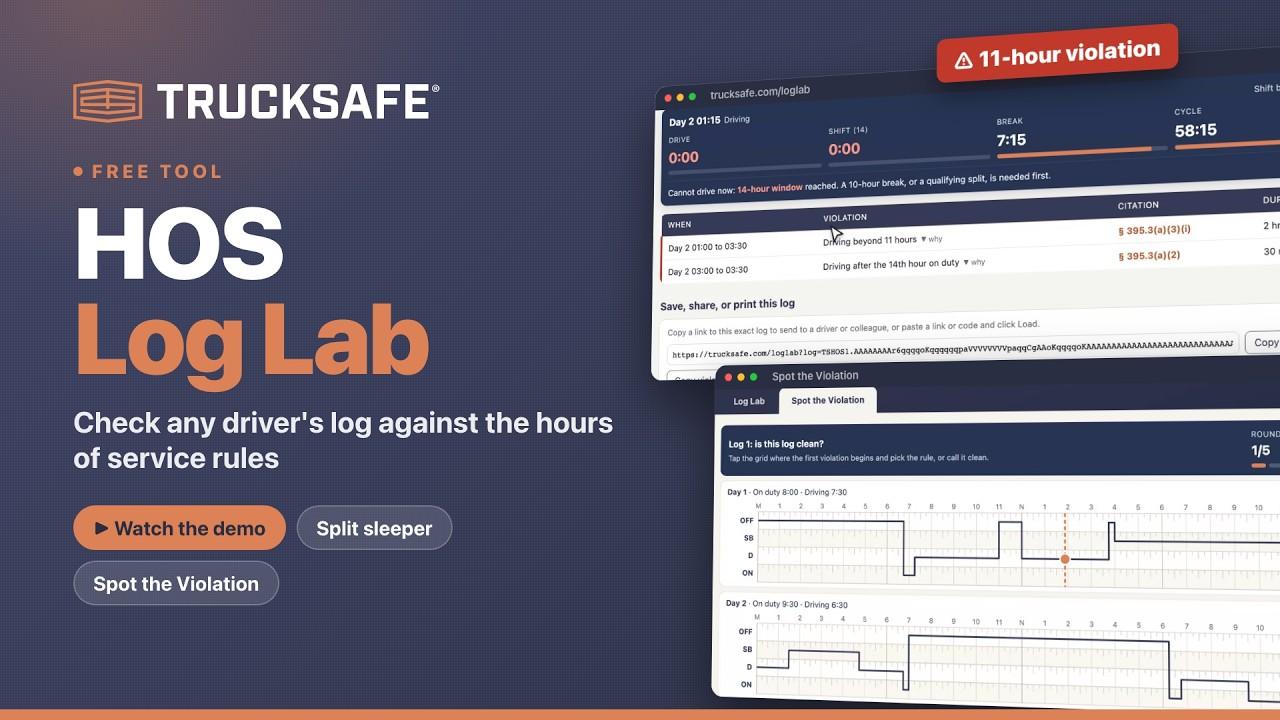
That's why we built the HOS Log Lab, a free tool that lets you build a driver's log and check it against the federal hours of service rules for property-carrying drivers in real time. Here's a two-minute walkthrough:
What the HOS Log Lab does
The Log Lab gives you an eight-day graph grid that looks and works like a paper log. Drag across a lane to set each duty status: off duty, sleeper berth, driving, or on duty not driving. On a phone, you can enter duty status changes by time instead. As the log takes shape, the tool checks it against the rules as you go.
Live clocks. A clock panel shows what's left on the 11-hour driving limit, the 14-hour window, the 30-minute break requirement, and the 60- or 70-hour limit, along with exactly when the driver would have to stop if they kept driving.
Violations with citations. When a log breaks a rule, the Log Lab flags it, names the rule, cites the section of 49 CFR Part 395, shows how long the violation lasted, and explains why it happened.
Cycle and adverse conditions. Switch between the 60-hour/7-day and 70-hour/8-day cycles, see a 34-hour restart in action, and apply the adverse driving conditions extension with one click.
Ready-made scenarios. Load examples for a compliant week, an 11-hour violation, a 14-hour window violation, a missed 30-minute break, the 70-hour limit, and split sleeper splits done right and done wrong. Or start from a blank log.
The split sleeper berth rule, made visible
The split sleeper berth provision is where we see the most confusion. A driver can split the 10-hour break into two periods: one of at least 7 consecutive hours in the sleeper berth, and another of at least 2 hours off duty or in the sleeper, totaling at least 10 hours.
Take a driver who drives 10.5 hours, takes 7 hours in the sleeper, then drives 3 more before a 3-hour break. The 7/3 pair qualifies, but the driving on either side of the sleeper period adds up to 13.5 hours. That's an 11-hour violation. The Log Lab shows exactly where it starts, which makes it a great teaching example.
Share it, print it, or send a report
When you're done, you can copy a link to that exact log and send it to a driver or colleague. They'll open the same log, violations and all. You can also print it or save it as a PDF for a driver's file, or copy a written violation report to paste into an email or a coaching note.
Test yourself with Spot the Violation
The second tab, Spot the Violation, turns the rules into a quick challenge. You get five logs. For each one, mark where the first violation begins and pick the rule that was broken, or call the log clean. It keeps score, and it's a good way to find out how well you and your team know the rules.
Ways to put it to work
Safety meetings and driver training. Put it on the big screen and walk through scenarios as a group. Build a log together and let the room predict the violation before the tool shows it.
One-on-one coaching. Rebuild a driver's day after a violation and show exactly where it went wrong, then send them the link to review on their own.
Onboarding. Train new drivers and dispatchers on the 11-hour, 14-hour, break, and cycle limits before they hit the road.
Audit preparation. Practice log reviews before a DOT audit so the patterns investigators look for become second nature.
What it doesn't cover
The Log Lab applies the core federal rules for property-carrying drivers, plus the adverse driving conditions extension. It doesn't model the short-haul exceptions, passenger-carrier rules, agricultural and other exemptions, personal conveyance, or yard moves. It's a training aid, not legal advice, and it doesn't replace a review of your actual records or the regulations themselves.
Try it free
The HOS Log Lab is free at trucksafe.com/loglab. No account needed.
If you want your team to know these rules cold, our Hours of Service course in Trucksafe Academy covers Part 395, ELDs, and the exceptions the Log Lab doesn't model. And if you'd like a second set of eyes on your drivers' actual logs, a Trucksafe mock audit samples your records the way an FMCSA investigator would.
